Introduction
AI agents that join your meetings and talk
We provide optimized documentation for both LLMs and recent MCP server updates. For more on our LLM integration, see LLMs and for MCP access, visit auth.meetingbaas.com.
Speaking Bots is a hosted API that sends an AI participant into a Google Meet, Zoom or Microsoft Teams call. The bot joins through MeetingBaas 🐟 like any recording bot, but it also listens, thinks and talks back, with a voice pipeline built on Pipecat. One request is enough:
curl -X POST https://speaking.meetingbaas.com/bots \
  -H "Content-Type: application/json" \
  -H "x-meeting-baas-api-key: your-api-key" \
  -d '{
    "meeting_url": "https://meet.google.com/abc-defg-hij",
    "bot_name": "Vibe",
    "prompt": "You are Vibe, an upbeat engineer. Keep turns to 2-3 sentences.",
    "entry_message": "Hey everyone, Vibe here. Let us get into it."
  }'
The bot joins the lobby, waits to be admitted, speaks its entry message, and then holds a conversation with whoever is in the call until you remove it or the meeting ends. The meeting is recorded and transcribed on your MeetingBaas account like any other bot.
Endpoint
The hosted API is at https://speaking.meetingbaas.com and creates bots on api.meetingbaas.com. The live OpenAPI document is at /openapi.json and there is a Swagger UI at /docs.
Authentication
Every request carries your MeetingBaas API key in the x-meeting-baas-api-key header. The bot is created on that account, so it appears in your dashboard, consumes your recording time, and its recording and transcript are retrieved through the regular MeetingBaas API under the bot_id you get back.
The speech and language providers behind the bot (LLM, speech-to-text, text-to-speech) run on MeetingBaas accounts by default. You can bring your own keys per bot instead.
What a bot can do
- Speak as a reusable persona from the bundled library, or as a one-off prompt you write in the request
- Use OpenAI, Anthropic or Z.ai as its brain, with the model chosen per bot
- Read documents and URLs you attach to the request, and call tools on your MCP servers during the call
- Take turns politely: configurable voice-activity detection, a re-engagement nudge when the room goes quiet, and floor control so several bots in one call do not talk over each other
- Speak faster or slower, with a Cartesia voice picked per persona
- Leave on request, and have the meeting transcribed by MeetingBaas with its own turns attributed to it by name
How it works
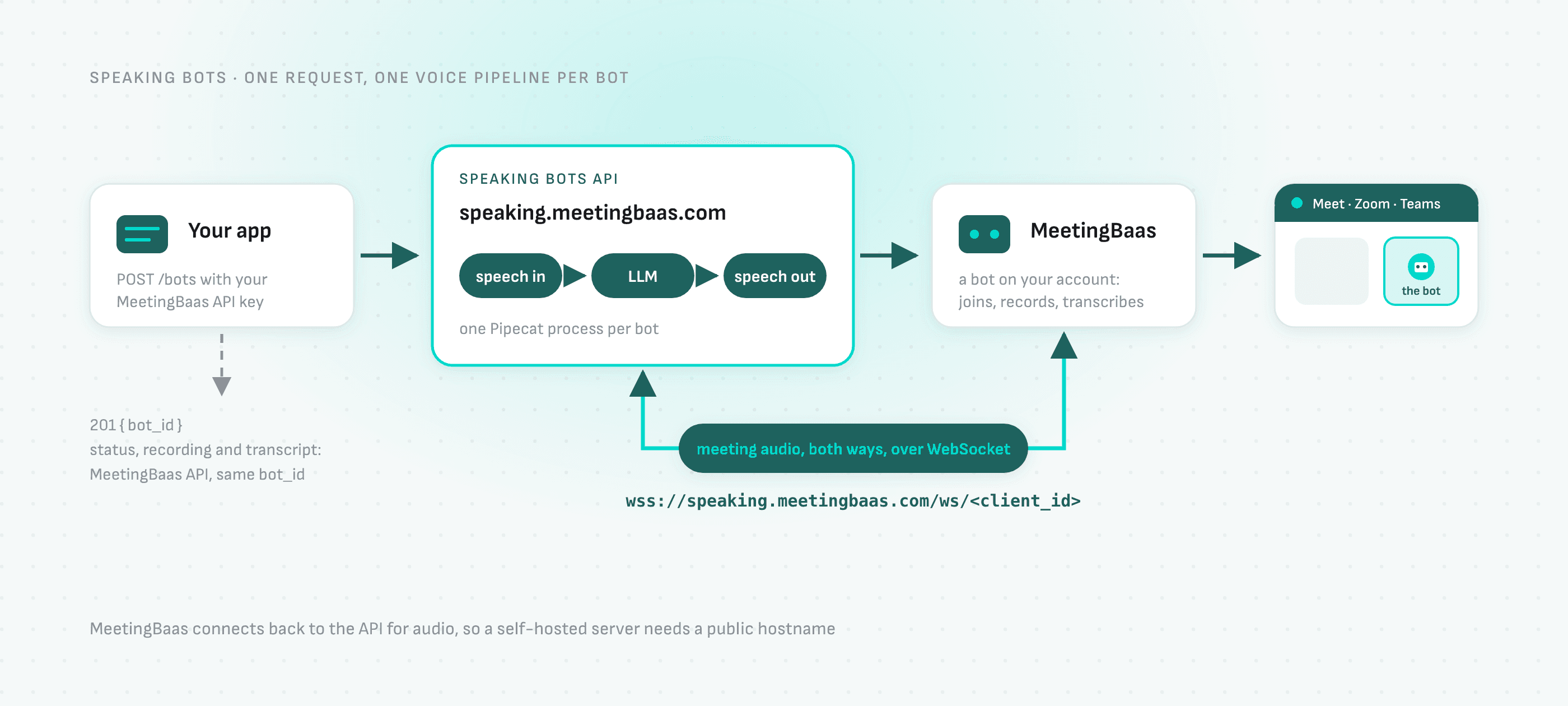
The API starts one voice pipeline per bot (speech-to-text → LLM → text-to-speech). Meeting audio streams both ways between MeetingBaas and that pipeline over a WebSocket on the API's own hostname, so the public hostname is part of the contract — which matters when you self-host.
Where to go next
- Sending a bot: the request, personas vs prompts, the bot's lifecycle
- Conversation tuning: model, voice speed, turn-taking
- Context and tools: documents, URLs and MCP servers
- API reference: every field, generated from the live schema
- Self-hosting: run the open-source server yourself
The server is open source: Meeting-Baas/speaking-meeting-bot. Contributions and pull requests are welcome.